I put a globe in the terminal. Type ttymap and a world map gets drawn in braille characters that you move around with hjkl. That alone is just an old-school terminal map viewer — but on top of it this thing can show you the planes flying over your house at this very moment, scatter the last 24 hours of earthquakes in color, or track the ISS passing overhead. All inside the terminal, in 256-color braille.
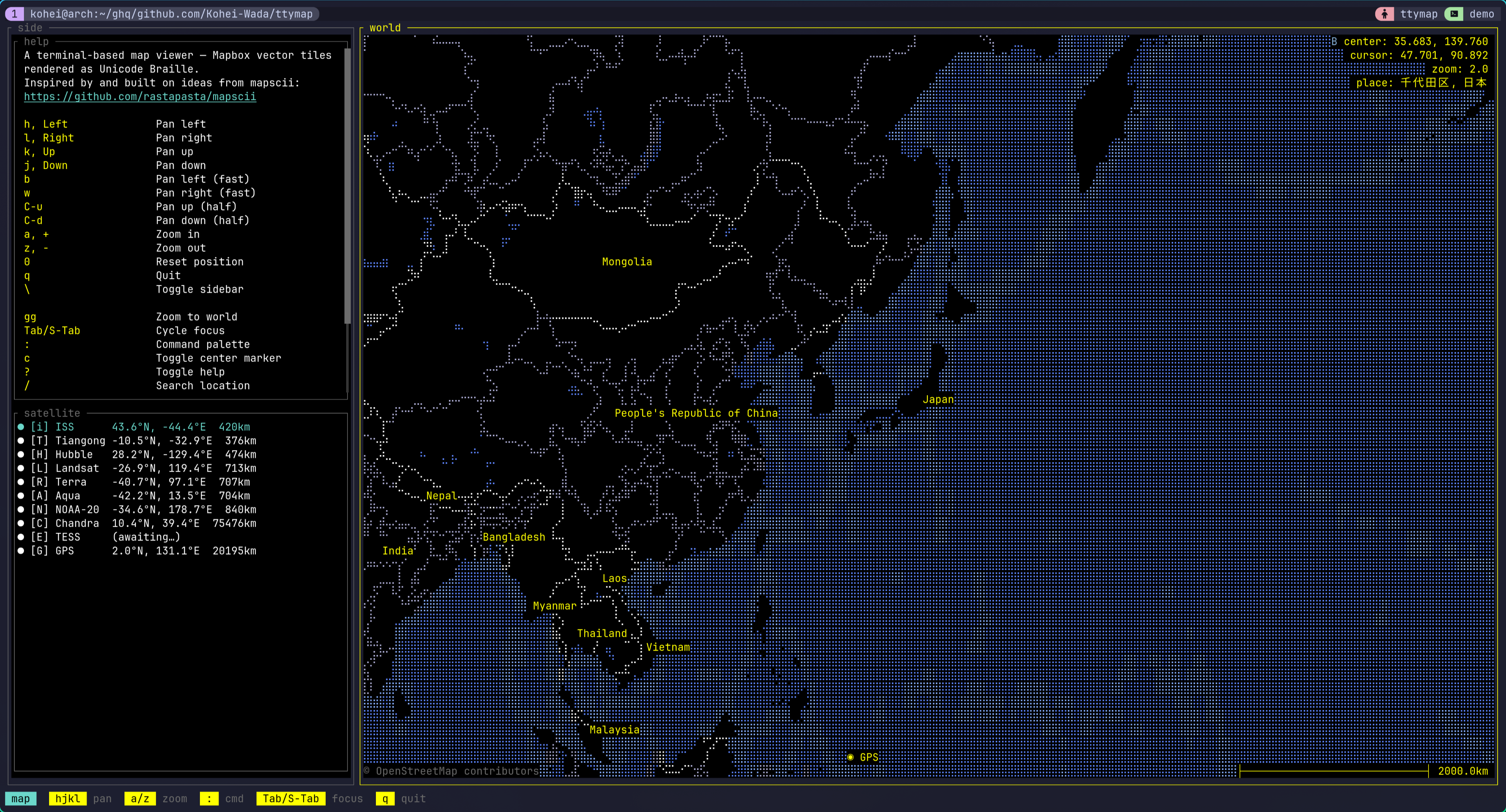
The demo videos and screenshots are collected in the repo’s README: https://github.com/Kohei-Wada/ttymap
What is this
The map core is straightforward. Decode Mapbox Vector Tiles, project with Mercator, bake it into Unicode Braille with 2×4 sub-pixels per cell, and lay ANSI 256-color on top. Features are spatially indexed with an R-tree. The mapscii-style “a map in your terminal” part is this one layer, and pulled out on its own it’s already a respectable viewer.
The controls are vim-flavored. hjkl to pan, b/w for fast pan, C-u/C-d for half-screen pan, a/z to zoom, gg for the whole world, 0 to reset. Mouse drag and scroll work too. : for the command palette, / for Nominatim location search. Press ? and you get a live cheatsheet generated from the active keymap plus the plugins’ palette entries.
Up to here it’s the “a map viewer that runs in the terminal” story. It gets interesting with the plugins that sit on top.
Showing it off with plugins
Almost every ttymap feature is a plugin, and 18 of them ship with the runtime. The answer to “what is ttymap actually for” turns out to be this list. Here are the fun ones, grouped by purpose.
Watching the planet
aircraft— pulls markers for the planes currently in the air from OpenSky’s public ADS-B feed. The sidebar lists altitude and speed; Enter centers the map on a given aircraft. Looking at the sky over my own house, there are more of them than you’d think.quake— scatters USGS magnitude-2.5+ earthquakes from the past 24 hours as colored markers. A list appears in the sidebar, and it auto-jumps to the highest-magnitude epicenter.satellite— tracks several objects at once like the ISS and Hubble. It fetches TLEs from CelesTrak and runs the orbit propagation (SGP4) in Lua.wiki— Wikipedia geosearch. Shows nearby articles as markers and a side panel; Enter opens an extract paragraph.
Playing
geo_quiz— “find this city before time runs out.” A target pops up and you have about 30 seconds to get the map center as close as possible. Submit with Enter and the camera flies to a view that frames both your guess and the real city with ◎ markers and a connecting line. The score is cumulative km error (golf-style, lower is better). Easy mode shows the country, hard mode doesn’t.travel— curated tours of Japan and Italy ship out of the box, with a choreographed pre-overview → per-city loop → post-overview tour. It’s driven byttymap.director, described below.autospin— the camera drifts eastward at a constant rate and loops at the antimeridian. The “this is a globe” demo. Pan by hand and it stops.antipode— from the palette, fly to the exact opposite point on the sphere. “Where’s the other side of the Earth from where I am right now?”here— IP-geolocates your current position and flies the camera home.
Networks on the map
traceroute— hitr, type a hostname, and astraceroute(8)resolves each next hop, the route’s polyline grows across the map hop by hop. The sidebar lists the hops (Enter flies to that router), there’s a per-hop color gradient, and consecutive*runs are collapsed in the panel. You can watch with your eyes where in the world your packets travel.ping_simulation— a growing animation of cities pinging each other. A reference implementation for animated polyline overlays.
Each plugin is a single *.lua (or a directory with init.lua) under runtime/lua/plugin/, readable as a tutorial for writing your own.
Not just a viewer
This is the part that pushes ttymap from “interactive viewer” up to “programmable globe.”
First, config is Lua. You write it in ~/.config/ttymap/init.lua. Unlike TOML, you can decide values with conditionals or computation — and that quietly pays off.
Then, scriptable scenes. There’s ttymap.animation.fly_to (frame-based pan/zoom) and ttymap.director (a coroutine scheduler with fly / wait / tween). A plugin can choreograph a multi-step camera-plus-overlay sequence as procedural Lua. A tour script looks like this:
local director = require "ttymap.director"
director.run(function()    ttymap.notify("Starting tour")    director.fly(139.69, 35.69, 10)   -- yields until the camera arrives in Tokyo    director.wait(120)                -- park there for ~2s at 60fps    director.fly(-74.00, 40.71, 10)   -- glide to New York    director.wait(120)    director.fly(2.35, 48.86, 10)     -- on to Paris    director.wait(120)end)
director.fly yields until the camera arrives. So just by writing “fly to Tokyo → wait → fly to NY” procedurally, the asynchronous animations play out in order. This is what the travel plugin actually is.
User plugins go in ~/.config/ttymap/lua/plugin/. With Neovim-style stem-dedup, a same-named file overrides a bundled plugin.
Trying it
Single-user install, no root:
git clone https://github.com/Kohei-Wada/ttymapcd ttymapmake installThis installs ~/.cargo/bin/ttymap and ~/.local/share/ttymap/ (the bundled runtime). cargo install on its own doesn’t place the runtime, so it fails fast with a “did you make install?” message.
Launch:
ttymap # default positionttymap --lat 35.68 --lon 139.76 --zoom 10 # Tokyottymap --style bright # bright themeTo “fly to my current location,” call the here plugin from the : palette.
You can also take a headless snapshot — for dashboards, cron, or pipes:
ttymap snap --lat 35.68 --lon 139.76 --zoom 12 # → stdoutttymap snap --lat 35.68 --lon 139.76 --zoom 12 -o tokyo.ans # → filesnap emits raw xterm-256 ANSI. cat the file in a compatible terminal or pipe it to less -R.
Still WIP
It’s stable enough to use daily, but it’s still WIP. CLI flags, the Lua surface, and the config schema can change without notice. Under the hood it’s a 7-crate workspace on Rust 2024 edition, and the build uses protox so no system protoc is needed.
The code and demo videos are here: https://github.com/Kohei-Wada/ttymap